
Phoenix, AZ · Maricopa County
Sexually Oriented Business Manager Permit Application
This application and information update form is for people seeking a new or renewed Phoenix sexually oriented business manager permit or reporting changes to information on file.
- licensed online notary
- ~15 min average
- Notarized PDF emailed
What you’ll need
- Government-issued photo ID
- Webcam-enabled device (laptop or phone)
- This form, ready to upload as a PDF
What this form is
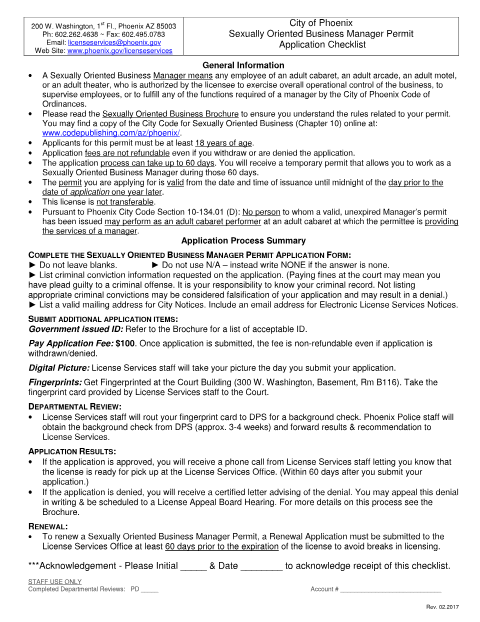
Use the application to request a new or renewed permit and provide personal, residence, business, identification, and criminal history details. The packet also includes an information update form for reporting changes such as a new legal name, address, phone number, or workplace. Phoenix requires applicants to submit the application and listed additional items, including proof of age and the fee; the checklist says review can take up to 60 days.
Who needs it
People applying for or renewing a Phoenix sexually oriented business manager permit, or updating information already on file with the City Clerk Department, use this packet.
Why it needs a notary
The application has a jurat reading “Subscribed and sworn to before me”; the applicant signs and swears the application before the notary.
How to get this notarized
- 1
Download the Application
Get the manager permit application packet and review its checklist and instructions.
- 2
Fill Out the Form
Complete the application without blanks; write NONE where applicable and provide the requested details.
- 3
Book an Online Notary
Schedule a live audio-video session with a commissioned online notary.
- 4
Sign on Video
Sign and swear to the application during the session so the notary can complete the jurat.
- 5
Submit to the City
Submit the application and required additional items to Phoenix License Services.
Preview the form
The blank PDF straight from Phoenix. Look it over, then upload your filled copy to start the notary session.

You’ll need ID and a webcam.
A licensed online notary will join you on video, verify your government-issued ID, witness your signature, and apply their seal. You’ll receive the notarized PDF by email when the session ends.
Frequently asked questions
- How do I get the manager permit application notarized online?
- Complete the form but wait to sign the application. Book a live audio-video session with a commissioned online notary, then sign and swear to the application during the session.
- Do I need to sign the application in front of a notary?
- Yes. The application includes a “Subscribed and sworn to before me” jurat. The applicant must sign and swear to the application before the notary.
- Can I use online notarization for this Phoenix form?
- Arizona has authorized remote online notarization by its own notaries since July 2020 (A.R.S. §41-371 et seq.) and recognizes acts by notaries from other states (A.R.S. §33-501). Confirm with the city/town if unsure.
- What should I bring to the permit application process?
- The checklist calls for a government-issued ID, a $100 application fee, and fingerprints. It says License Services staff take the applicant’s picture when the application is submitted.