
Phoenix, AZ · Maricopa County
Liquor License Application Questionnaire
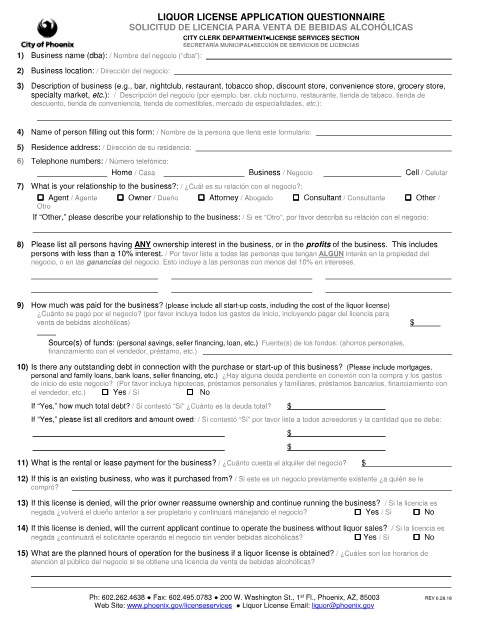
This questionnaire gathers business, ownership, financial, operating, and property details from the person completing a Phoenix liquor license application.
- licensed online notary
- ~15 min average
- Notarized PDF emailed
What you’ll need
- Government-issued photo ID
- Webcam-enabled device (laptop or phone)
- This form, ready to upload as a PDF
What this form is
The questionnaire asks about the business, everyone with an ownership or profit interest, purchase costs and debts, planned activities, permits, construction, and other application details. The applicant or agent completes it as part of a liquor license application submitted to Phoenix License Services. The form also includes a sworn statement that the answers are true to the signer’s knowledge and warns that false information may have consequences.
Who needs it
A person completing a Phoenix liquor license application for a business, such as its owner, agent, attorney, or consultant, may need to complete this questionnaire.
Why it needs a notary
The form carries a state jurat with “Subscribed and sworn to” wording; the person who filled out the form signs and swears or affirms its statements before the notary.
How to get this notarized
- 1
Download The Questionnaire
Get the Phoenix Liquor License Application Questionnaire from the city.
- 2
Fill Out The Form
Answer the business, ownership, financial, operating, and property questions, and review the sworn statement.
- 3
Book An Online Notary
Schedule a Rush Notary session with a commissioned online notary.
- 4
Sign On Video
Join the live audio-video session, then sign and swear or affirm the statement before the notary.
- 5
Submit To The City
Follow Phoenix License Services’ instructions to submit the notarized questionnaire with your application.
Preview the form
The blank PDF straight from Phoenix. Look it over, then upload your filled copy to start the notary session.

You’ll need ID and a webcam.
A licensed online notary will join you on video, verify your government-issued ID, witness your signature, and apply their seal. You’ll receive the notarized PDF by email when the session ends.
Frequently asked questions
- How do I get the liquor license questionnaire notarized online?
- Complete the questionnaire, then book a Rush Notary session. A commissioned online notary meets with you over live audio-video, where you sign and swear or affirm the form.
- Do I need to sign the questionnaire in front of a notary?
- Yes. The form includes a state jurat and says the statement is given under oath or affirmation. Sign and swear or affirm before the notary.
- Can I use remote online notarization for this Phoenix form?
- Arizona has authorized remote online notarization for its own notaries since July 2020 under A.R.S. §41-371 et seq., and recognizes notarial acts by notaries of other states under A.R.S. §33-501. Confirm with the city/town if unsure.
- Who completes the liquor license questionnaire?
- The person filling out the form provides details about the business, ownership, finances, operations, permits, and other items. The applicant or an agent, owner, attorney, consultant, or other representative may complete it.
Other forms in Phoenix
Amusement License Application
Phoenix
Waiver of Claims for Diminution in Value
Phoenix
Downtown Alley Abandonment Affidavit of Notification
Phoenix
Escort Identification Card Request Form
Phoenix
Mobile Vendor / Mobile Food Vendor License Application
Phoenix
Sexually Oriented Business Manager Permit Application
Phoenix