
Phoenix, AZ · Maricopa County
Amusement License Application
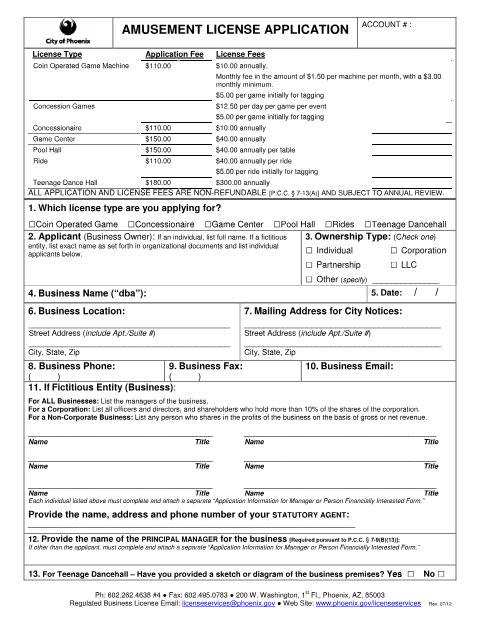
This 12-page packet is for Phoenix businesses applying for an amusement license, reporting ownership or business information, or submitting related forms for amusement activities.
- licensed online notary
- ~15 min average
- Notarized PDF emailed
What you’ll need
- Government-issued photo ID
- Webcam-enabled device (laptop or phone)
- This form, ready to upload as a PDF
What this form is
The packet covers amusement license applications for businesses such as game centers, pool halls, rides, and teenage dancehalls, along with related applicant information and event forms. It also includes forms for ownership or control changes, information updates, and tag requests. The ownership-change authorization has sworn statements and notary blocks; applicants should complete the form that applies to their situation and submit it to Phoenix City Clerk License Services.
Who needs it
Business owners and applicants seeking an amusement license or reporting a covered ownership, control, or business-information change to Phoenix may need this packet.
Why it needs a notary
The ownership-change authorization has separate jurat blocks for the owner or authorized agent and new applicant, who must each sign and swear before a notary.
How to get this notarized
- 1
Download The Packet
Get the amusement application packet and identify the form that matches your license or ownership-change filing.
- 2
Complete The Form
Fill in the applicable information. For an ownership change, complete the relevant authorization and sworn statement fields.
- 3
Book An Online Notary
Schedule a Rush Notary session for each signer whose ownership-change authorization includes a notary block.
- 4
Sign On Video
Meet with a commissioned online notary over live audio-video and sign and swear to the statement when directed.
- 5
Submit To Phoenix
Submit the completed applicable forms to Phoenix City Clerk License Services using the city's accepted method.
Preview the form
The blank PDF straight from Phoenix. Look it over, then upload your filled copy to start the notary session.

You’ll need ID and a webcam.
A licensed online notary will join you on video, verify your government-issued ID, witness your signature, and apply their seal. You’ll receive the notarized PDF by email when the session ends.
Frequently asked questions
- Which part of the amusement packet needs notarization?
- The ownership-change authorization includes two separate “Subscribed and sworn to” blocks: one for the owner or authorized agent and one for the applicant. The main license application includes a sworn statement but no notary block in the supplied text.
- How do I get the ownership-change authorization notarized online?
- Complete the relevant fields, then book a session with Rush Notary. A commissioned online notary meets with you over live audio-video. Sign and swear to the statement during the session, then submit the completed form to the city.
- Do I need a notary for every form in this packet?
- The supplied packet shows notary blocks on the ownership-change authorization, not on every included form. Check which form applies to your filing and confirm with the city if unsure.
- Can a remote online notarization be used for this form?
- Arizona has authorized remote online notarization for its own notaries since July 2020 (A.R.S. §41-371 et seq.) and recognizes notarial acts by notaries of other states (A.R.S. §33-501). Ask Phoenix City Clerk License Services about its submission requirements.
Other forms in Phoenix
Waiver of Claims for Diminution in Value
Phoenix
Downtown Alley Abandonment Affidavit of Notification
Phoenix
Escort Identification Card Request Form
Phoenix
Liquor License Application Questionnaire
Phoenix
Mobile Vendor / Mobile Food Vendor License Application
Phoenix
Sexually Oriented Business Manager Permit Application
Phoenix