
College Station, TX · Brazos County
Itinerant Vendor Permit Notary Page
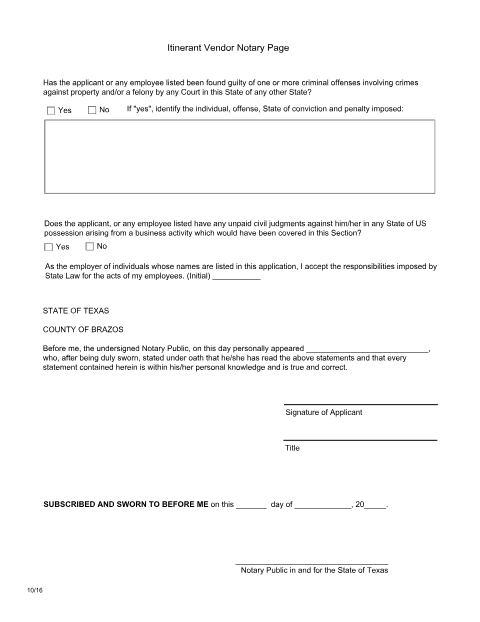
The standalone jurat page attached to College Station's itinerant/peddler vendor permit application, sworn to before a notary.
- licensed online notary
- ~15 min average
- Notarized PDF emailed
What you’ll need
- Government-issued photo ID
- Webcam-enabled device (laptop or phone)
- This form, ready to upload as a PDF
What this form is
College Station requires itinerant vendors and peddlers to complete a sworn statement as part of their permit application, on a dedicated notary page filed with the City. The applicant attests to the accuracy of the permit information, and the page must be signed and notarized before submission to the City Secretary or Police Department for permit issuance.
Who needs it
Itinerant vendors, peddlers, and door-to-door solicitors applying for a permit to operate in College Station.
Why it needs a notary
This is a dedicated jurat/notary page for the vendor permit application, so it must be signed and sworn before a notary as part of the permit packet.
How to get this notarized
- 1
Download the Form
Get the itinerant vendor permit notary page from Rush Notary.
- 2
Complete the Page
Fill in your vendor and application information as instructed.
- 3
Book an Online Notary
Schedule a remote online notarization session.
- 4
Sign on Video
Verify your identity and sign before a commissioned online notary.
- 5
Submit to the City
Include the notarized page with your itinerant vendor permit application.
Preview the form
The blank PDF straight from College Station. Look it over, then upload your filled copy to start the notary session.

You’ll need ID and a webcam.
A licensed online notary will join you on video, verify your government-issued ID, witness your signature, and apply their seal. You’ll receive the notarized PDF by email when the session ends.
Frequently asked questions
- How do I notarize my itinerant vendor notary page online?
- Upload the page, book a live video session with a commissioned online notary, verify your identity, and sign electronically.
- Do I need this page for every vendor permit renewal?
- Check with College Station's permitting office for renewal requirements, as some jurisdictions require a fresh sworn statement each renewal cycle.
- Is remote online notarization accepted for a vendor permit?
- Texas has authorized remote online notarization since 2018; check with the city if you are unsure whether they will accept it for this permit.
- What do I submit with this notarized page?
- File it together with the rest of your itinerant vendor permit application with the City of College Station.