
Kyle, TX · Hays County
Landowner Authorization and Affidavit of Ownership
A sworn affidavit a property owner or their authorized company representative signs to confirm ownership and authorize an agent to file a development application with the City of Kyle.
- licensed online notary
- ~15 min average
- Notarized PDF emailed
What you’ll need
- Government-issued photo ID
- Webcam-enabled device (laptop or phone)
- This form, ready to upload as a PDF
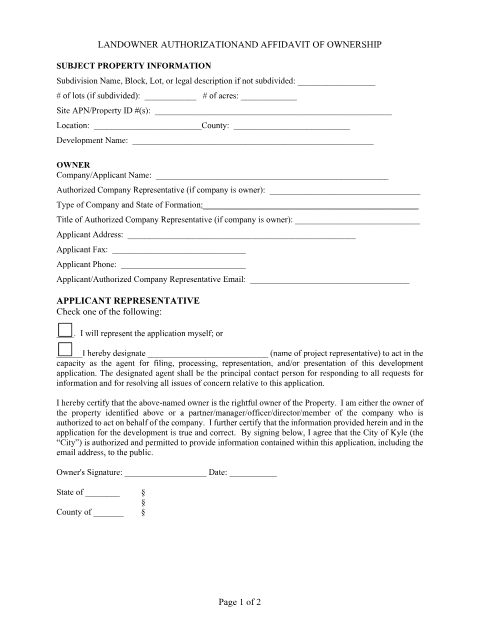
What this form is
Kyle's Planning Services division requires this form with every development or planning application. It confirms who legally owns the subject property and lets the owner designate a representative to handle filing, processing, and communication with city staff. Because it certifies ownership under oath, the City requires the signature to be acknowledged before a notary.
Who needs it
Property owners, developers, or their authorized company representatives filing any planning, zoning, or development application with the City of Kyle.
Why it needs a notary
Page two contains a statutory acknowledgment block ('This instrument was acknowledged before me on...') that must be completed and signed by a notary public.
How to get this notarized
- 1
Download the Form
Get the Landowner Authorization and Affidavit of Ownership form from the City of Kyle website.
- 2
Fill In Property and Owner Details
Complete the subject property information and owner/applicant representative sections.
- 3
Book an Online Notary Session
Schedule a video appointment with a commissioned online notary at a time that works for you.
- 4
Verify Your Identity
Present a valid photo ID to the notary during the video call for identity verification.
- 5
Sign on Video
Sign the affidavit while the notary watches live and completes the acknowledgment on page two.
- 6
Submit to the City
Upload or deliver the notarized form with your Kyle planning or development application.
Preview the form
The blank PDF straight from Kyle. Look it over, then upload your filled copy to start the notary session.

You’ll need ID and a webcam.
A licensed online notary will join you on video, verify your government-issued ID, witness your signature, and apply their seal. You’ll receive the notarized PDF by email when the session ends.
Frequently asked questions
- How do I get my Kyle landowner authorization form notarized?
- Download the form, fill it out, then book an online notarization session where a commissioned online notary verifies your ID and witnesses your signature over live video.
- Do I need a notary for this form?
- Yes. Page two of the form is a statutory acknowledgment that must be signed in front of a notary public before the City of Kyle will accept the planning application.
- Can I use remote online notarization for a Kyle city form?
- Texas has authorized remote online notarization since 2018, and acknowledgments taken by a commissioned online notary are accepted for city filings. Check with the City of Kyle Planning Services if you are unsure.
- Who can sign the landowner authorization form?
- The property owner, or a partner, manager, officer, director, or member of the owning company authorized to act on its behalf, must sign before a notary.
- What do I need for my video notarization appointment?
- A valid government-issued photo ID and the completed, unsigned form — you will sign it live on camera in front of the online notary.