
Seagoville, TX · Dallas County
Property Owner Consent Form
A notarized form Seagoville property owners sign to grant someone else permission to pull permits or perform work on their property.
- licensed online notary
- ~15 min average
- Notarized PDF emailed
What you’ll need
- Government-issued photo ID
- Webcam-enabled device (laptop or phone)
- This form, ready to upload as a PDF
What this form is
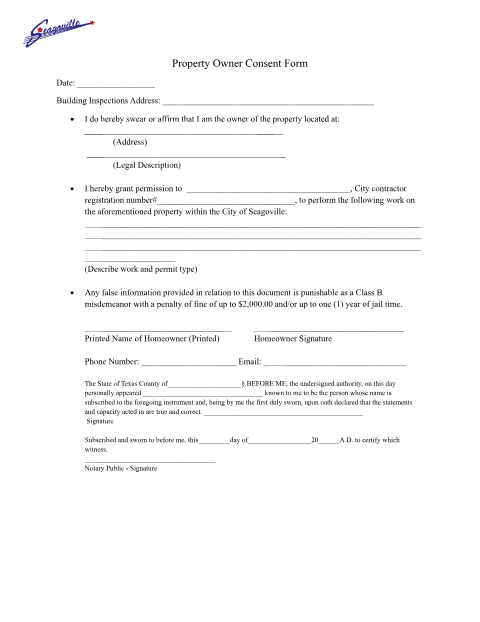
When someone other than the property owner needs to pull a permit in Seagoville — a tenant, contractor, or buyer — the owner swears before a notary that they hold title to the property and grants that person permission to act on the property. Building Inspections keeps the notarized consent form with the permit file.
Who needs it
Seagoville property owners granting a tenant, contractor, or other party permission to pull permits on their property.
Why it needs a notary
The form includes a Texas jurat requiring the property owner's signature to be sworn and subscribed before a notary public.
How to get this notarized
- 1
Download the Form
Get the Property Owner Consent Form from the City of Seagoville Forms & Helpful Resources page.
- 2
Fill In Property and Permittee Details
Enter the address, legal description, and who you're granting permission to.
- 3
Book an Online Notary Session
Schedule a video session with a commissioned online notary at Rush Notary.
- 4
Sign on Video
Appear on camera, verify your identity, and sign the sworn statement before the notary.
- 5
Submit to the City
Attach the notarized consent form to the permit application with Seagoville Building Inspections.
Preview the form
The blank PDF straight from Seagoville. Look it over, then upload your filled copy to start the notary session.

You’ll need ID and a webcam.
A licensed online notary will join you on video, verify your government-issued ID, witness your signature, and apply their seal. You’ll receive the notarized PDF by email when the session ends.
Frequently asked questions
- How do I get my Seagoville Property Owner Consent Form notarized online?
- Fill in the property address and who you're granting permission to, then book a video session with a commissioned online notary.
- Do I need to notarize the Property Owner Consent Form?
- Yes. The form requires the owner's signature to be sworn before a notary before Seagoville Building Inspections will accept it.
- Who signs the Property Owner Consent Form?
- The property owner granting someone else permission to pull permits or perform work on the property.
- Can an online notary handle a Seagoville consent form?
- Yes, Texas recognizes acknowledgments and jurats taken by commissioned online notaries; check with the city if you are unsure whether they will accept it.