
Garland, TX · Dallas County
Miscellaneous Review Application
A notarized catch-all application Garland property owners use for alcohol distance waivers, alley waivers, development standards variances, and fence variances.
- licensed online notary
- ~15 min average
- Notarized PDF emailed
What you’ll need
- Government-issued photo ID
- Webcam-enabled device (laptop or phone)
- This form, ready to upload as a PDF
What this form is
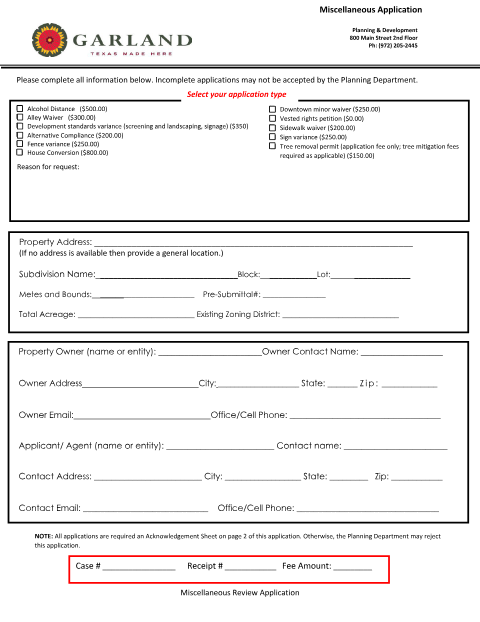
For smaller zoning-adjacent requests that don't need a full public hearing — alcohol distance exceptions, alley waivers, screening/landscaping or signage variances, and fence variances — Garland Planning & Development uses this Miscellaneous Review Application. It carries the same notarized Acknowledgment as the city's other planning applications, sworn by the property owner or authorized agent.
Who needs it
Garland property owners or agents seeking an alcohol distance waiver, alley waiver, development standards variance, or fence variance.
Why it needs a notary
The application's Acknowledgment sheet requires the property owner's or agent's signature to be sworn before a notary public.
How to get this notarized
- 1
Download the Form
Get the Miscellaneous Review Application from Garland Planning & Development's Forms & Applications page.
- 2
Select Your Request Type
Check the applicable box (alcohol distance, alley waiver, fence variance, etc.) and enter property details.
- 3
Book an Online Notary Session
Schedule a video session with a commissioned online notary at Rush Notary.
- 4
Sign on Video
Appear on camera, verify your identity, and sign the Acknowledgment before the notary.
- 5
Submit to the City
File the notarized application with the City of Garland Planning & Development Department.
Preview the form
The blank PDF straight from Garland. Look it over, then upload your filled copy to start the notary session.

You’ll need ID and a webcam.
A licensed online notary will join you on video, verify your government-issued ID, witness your signature, and apply their seal. You’ll receive the notarized PDF by email when the session ends.
Frequently asked questions
- How do I get my Garland Miscellaneous Review Application notarized online?
- Check the box for your request type (alley waiver, fence variance, etc.), then book a video session with a commissioned online notary to sign the Acknowledgment.
- Do I need to notarize the Miscellaneous Review Application?
- Yes. The Acknowledgment sheet requires your signature to be sworn before a notary before Garland Planning & Development will accept it.
- What requests use the Miscellaneous Review Application?
- Alcohol distance waivers, alley waivers, development standards variances (screening, landscaping, signage), alternative compliance, and fence variances.
- Can an online notary handle a Garland miscellaneous application?
- Yes, Texas recognizes acknowledgments taken by commissioned online notaries; check with the city if you are unsure whether they will accept it.