
West Point, GA · Harris County
Temporary Power Connection to Service Utilities Affidavit
A sworn affidavit an electrical contractor files with West Point to certify a temporary-to-permanent power connection meets code before utilities are energized.
- licensed online notary
- ~15 min average
- Notarized PDF emailed
What you’ll need
- Government-issued photo ID
- Webcam-enabled device (laptop or phone)
- This form, ready to upload as a PDF
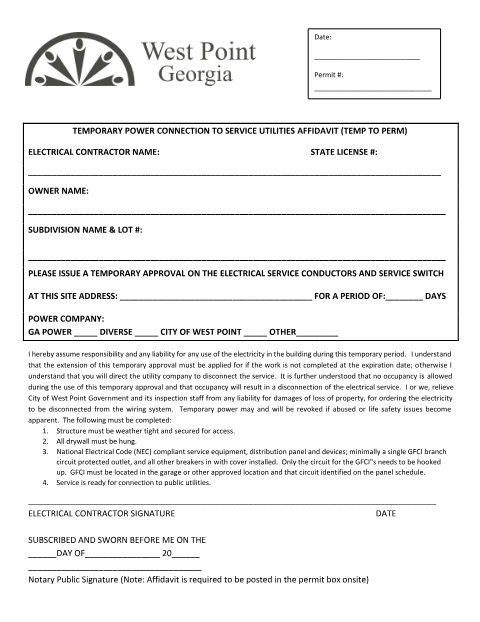
What this form is
Before West Point utilities will energize a temporary-to-permanent power connection, the licensed electrical contractor and property owner must complete a notarized affidavit certifying the work complies with applicable codes. The form records the contractor's state license number, the property location, and the sworn certification.
Who needs it
Licensed electrical contractors and property owners requesting a temporary-to-permanent power connection in West Point.
Why it needs a notary
The affidavit must be signed and notarized before West Point utility services will connect temporary power at the property.
How to get this notarized
- 1
Download the Form
Get the Temporary Power Connection Affidavit PDF from the City of West Point document library.
- 2
Fill in Contractor and Property Details
Enter the electrical contractor's license number, owner name, and subdivision/lot information.
- 3
Book an Online Notary Session
Schedule a remote online notarization appointment with Rush Notary.
- 4
Sign on Video with ID Verification
Verify your identity and sign the affidavit during the video session.
- 5
Submit for Utility Connection
Deliver the notarized affidavit to the city so temporary power can be connected.
Preview the form
The blank PDF straight from West Point. Look it over, then upload your filled copy to start the notary session.

You’ll need ID and a webcam.
A licensed online notary will join you on video, verify your government-issued ID, witness your signature, and apply their seal. You’ll receive the notarized PDF by email when the session ends.
Frequently asked questions
- Do I need to notarize this temporary power affidavit?
- Yes. West Point requires the electrical contractor's affidavit to be signed before a notary before it will connect temporary power service.
- How do I get this form notarized online?
- Complete the contractor, owner, and subdivision details, then meet a remote online notary by video to sign and have your signature notarized.
- Where do I submit the notarized affidavit?
- Submit it to West Point's utility or building department along with your service connection request.
- Do I need this if I already have permanent power approved?
- This affidavit is specifically for temporary-to-permanent connections; check with the city if your situation differs.