
Guyton, GA · Effingham County
Homeowner Building Permit Affidavit
A sworn affidavit a Guyton homeowner signs to build on their own property without a licensed contractor, per Georgia's owner-builder law.
- licensed online notary
- ~15 min average
- Notarized PDF emailed
What you’ll need
- Government-issued photo ID
- Webcam-enabled device (laptop or phone)
- This form, ready to upload as a PDF
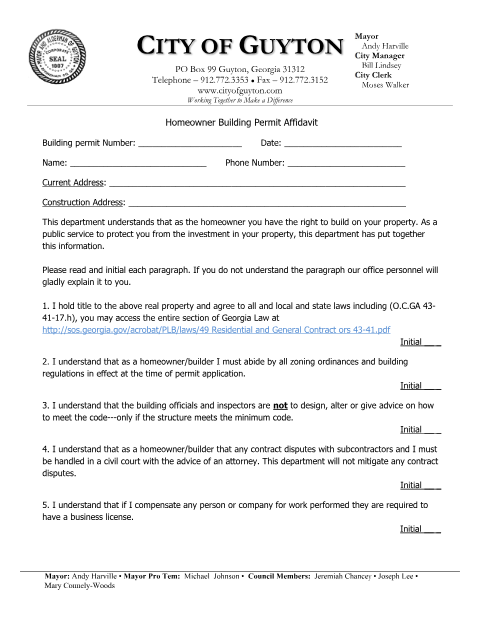
What this form is
The City of Guyton requires homeowners who intend to act as their own contractor to read and initial a series of disclosures about the responsibilities they are taking on, then sign a sworn statement citing O.C.G.A. §43-41-17. The affidavit protects both the city and the homeowner by documenting that the owner understands the applicable state and local building requirements before work begins.
Who needs it
Guyton homeowners who want to build or renovate their own home without hiring a licensed general contractor.
Why it needs a notary
The affidavit cites O.C.G.A. §43-41-17's owner-builder exemption and includes notary signature and commission-expiration blocks that must be completed before a notary public.
How to get this notarized
- 1
Download the Form
Get the Homeowner Building Permit Affidavit from the City of Guyton's building permit forms page.
- 2
Read and Initial Each Section
Review the disclosures about owner-builder responsibilities and initial each paragraph.
- 3
Book an Online Notary
Schedule a remote online notarization session.
- 4
Sign on Video
Sign the affidavit before the notary over live video.
- 5
Submit with Your Permit
Deliver the notarized affidavit to the City of Guyton with your building permit application.
Preview the form
The blank PDF straight from Guyton. Look it over, then upload your filled copy to start the notary session.

You’ll need ID and a webcam.
A licensed online notary will join you on video, verify your government-issued ID, witness your signature, and apply their seal. You’ll receive the notarized PDF by email when the session ends.
Frequently asked questions
- How do I get the Guyton homeowner affidavit notarized?
- Read and initial each disclosure paragraph, fill in your building permit and address details, then sign before an online notary over video.
- Do I need a notary to be my own contractor in Guyton?
- Yes, the affidavit relies on Georgia's owner-builder exemption under O.C.G.A. §43-41-17 and must be signed before a notary public.
- Can I sign this affidavit remotely?
- Yes, a remote online notarization session can complete the signature; check with the city if unsure about acceptance.
- What happens after the affidavit is notarized?
- Submit the signed, notarized affidavit with your building permit application to the City of Guyton.