
Tucker, GA · DeKalb County
Authorized Permit Agent Affidavit
A notarized affidavit a state-licensed contractor signs to designate an individual to pull permits on their behalf for a Tucker project.
- licensed online notary
- ~15 min average
- Notarized PDF emailed
What you’ll need
- Government-issued photo ID
- Webcam-enabled device (laptop or phone)
- This form, ready to upload as a PDF
What this form is
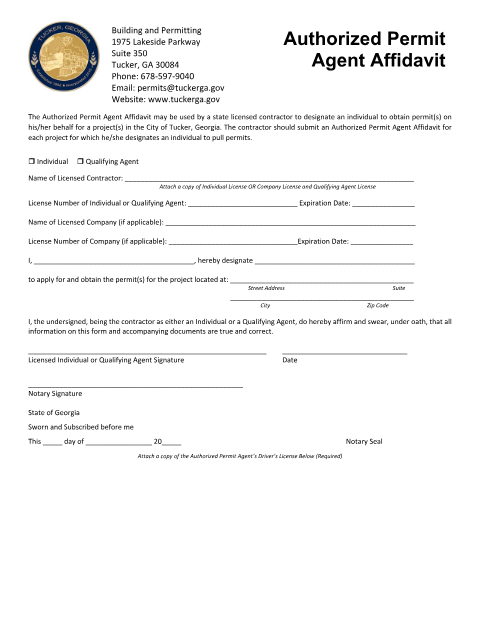
Contractors who cannot personally handle every permit application can use this affidavit to name an Authorized Permit Agent for a specific project. Tucker requires a separate affidavit per project, and the contractor's designation must be signed under oath before a notary.
Who needs it
State-licensed contractors in Tucker who want to designate someone to obtain permits on their behalf.
Why it needs a notary
The affidavit has two signature fields and a notary field with 'sworn to,' 'subscribed and sworn before me,' and a state jurat, so it must be notarized.
How to get this notarized
- 1
Download the Form
Get the Authorized Permit Agent Affidavit from Tucker's Building & Permitting page.
- 2
Fill In Contractor and Agent Details
Enter your license information and the individual designated for the project.
- 3
Book an Online Notary
Schedule a remote online notarization session.
- 4
Sign on Video
Sign the affidavit under oath before the notary on a live video call.
- 5
Submit to the City
File the notarized affidavit with Tucker's Building Permits Division.
Preview the form
The blank PDF straight from Tucker. Look it over, then upload your filled copy to start the notary session.

You’ll need ID and a webcam.
A licensed online notary will join you on video, verify your government-issued ID, witness your signature, and apply their seal. You’ll receive the notarized PDF by email when the session ends.
Frequently asked questions
- How do I notarize the Tucker Authorized Permit Agent Affidavit online?
- Complete the contractor and agent details for the project, then meet an online notary by video to sign the affidavit under oath before submitting it.
- Do I need a notary for this affidavit?
- Yes, the affidavit's signature and notary blocks require a notary's signature and stamp.
- Do I need a separate affidavit for each project?
- Yes, the contractor should submit an Authorized Permit Agent Affidavit for each project designating an individual to pull permits.
- Who can I designate as my permit agent?
- Any individual you authorize, whether an employee, expediter, or other representative acting on your license.