
Auburn, GA · Barrow County
S.A.V.E. Affidavit
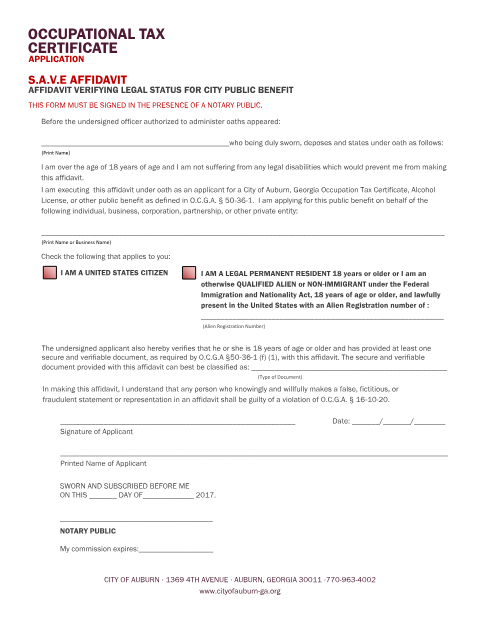
The state-mandated citizenship/immigration status affidavit that applicants must sign before a notary to receive an occupational tax certificate or other public benefit from the City of Auburn.
- licensed online notary
- ~15 min average
- Notarized PDF emailed
What you’ll need
- Government-issued photo ID
- Webcam-enabled device (laptop or phone)
- This form, ready to upload as a PDF
What this form is
Georgia's Systematic Alien Verification for Entitlements (SAVE) program requires anyone applying for a city public benefit, including an occupational tax certificate, to swear to their citizenship or lawful immigration status. The City of Auburn's version states plainly that it must be signed in the presence of a notary public.
Who needs it
Anyone applying for an occupational tax certificate or other public benefit from the City of Auburn.
Why it needs a notary
The form itself instructs 'THIS FORM MUST BE SIGNED IN THE PRESENCE OF A NOTARY PUBLIC' and must be sworn before a notary along with a secure and verifiable ID, as required by O.C.G.A. §50-36-1.
How to get this notarized
- 1
Download the Form
Get the S.A.V.E. Affidavit from the City of Auburn website.
- 2
Fill It Out
Complete your name and status information before your session.
- 3
Book an Online Notary
Schedule a remote online notarization session with Rush Notary.
- 4
Verify Your ID
Show a secure, verifiable ID on camera to the notary.
- 5
Sign on Video
Sign and swear the affidavit before the notary during the video call.
- 6
Submit to the City
Attach the notarized affidavit to your occupational tax application.
Preview the form
The blank PDF straight from Auburn. Look it over, then upload your filled copy to start the notary session.

You’ll need ID and a webcam.
A licensed online notary will join you on video, verify your government-issued ID, witness your signature, and apply their seal. You’ll receive the notarized PDF by email when the session ends.
Frequently asked questions
- Do I need this SAVE affidavit notarized?
- Yes, the City of Auburn's SAVE affidavit must be signed in the presence of a notary as part of your occupational tax application.
- How do I get my SAVE affidavit notarized online?
- Upload the form, verify your identity with a secure ID on video, and sign before a commissioned online notary in a short session.
- What ID do I need for a SAVE affidavit?
- O.C.G.A. §50-36-1 requires a secure and verifiable form of identification presented to the notary at the time of signing.
- Can an out-of-state online notary notarize a Georgia SAVE affidavit?
- Yes — Georgia recognizes acknowledgments and jurats taken by notaries commissioned in other states under O.C.G.A. §44-2-21.
- Where do I submit the notarized affidavit?
- Submit it with your occupational tax application to the City of Auburn; check with the city if you're unsure which department to use.